Network engineers spend a large portion of their time validating network changes.
We log into routers, check routing tables, run pings and trace routes to confirm everything works as expected.
The challenge is that this process is manual, repetitive and easy to miss something.
In software engineering, developers solved this problem long ago with automated testing. Every code change runs through a test suite that verifies expected behavior before it is merged or deployed.
In this article, I’ll walk through a simple Batfish demo that shows how the same concept can be applied to networking.
We’ll cover:
- Exploring a network using Batfish and Jupyter Notebook
- Writing tests that verify network behavior
- Running those tests automatically using a CI pipeline
The full demo repository is available here:
Repository:
https://github.com/ppklau/network_automation/tree/main/learning/batfish
Exploring Batfish with Jupyter Notebook
One of the best ways to start learning Batfish is through Jupyter Notebook.
Jupyter provides an interactive environment where you can:
- Load network configurations
- Ask questions about the network
- Test routing behavior
- Validate expected outcomes
The repository includes a notebook that walks through these concepts step by step. The notebook structure makes it easy to experiment and understand what Batfish is doing behind the scenes.
The typical workflow looks like this:
- Initialize Batfish
- Load a network snapshot
- Explore the network topology
- Ask questions about routing and reachability
- Turn those checks into tests
Initializing Batfish
The first step in the notebook is initializing Batfish and loading the network snapshot.
A snapshot represents the entire network state, including all device configurations.
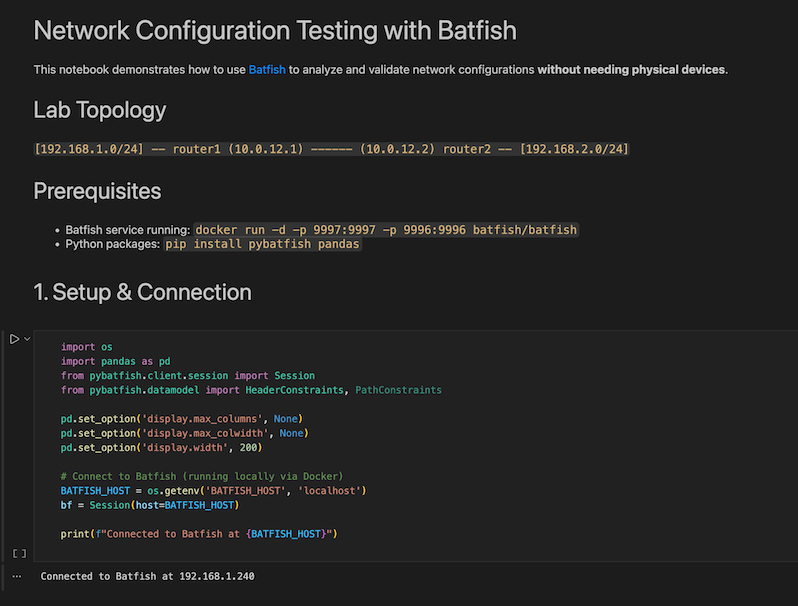
Once the snapshot is loaded, Batfish parses the configurations and builds a model of the network. This allows us to analyze the control plane and data plane behavior without interacting with the actual devices.
Inspecting the Network
Next, the notebook confirms that Batfish has correctly parsed the network.
For example, we can list all nodes in the network.
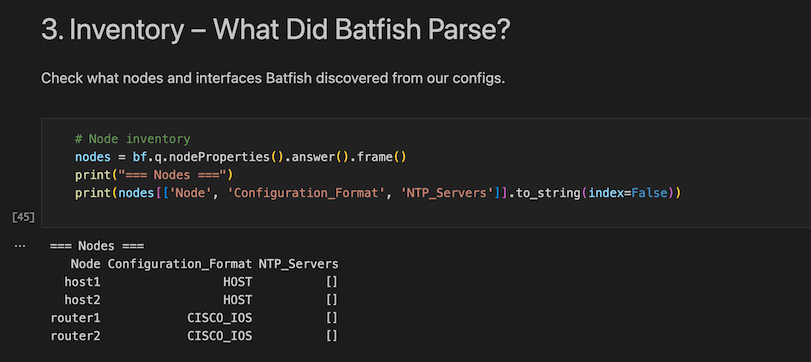
This step verifies that all device configurations were successfully imported into the model.
From here we can begin asking higher-level questions about the network.
Testing Reachability
One of the most powerful features of Batfish is reachability analysis.
Instead of manually running pings or traceroutes between devices, we can ask Batfish questions such as:
Can traffic from Network A reach Network B?
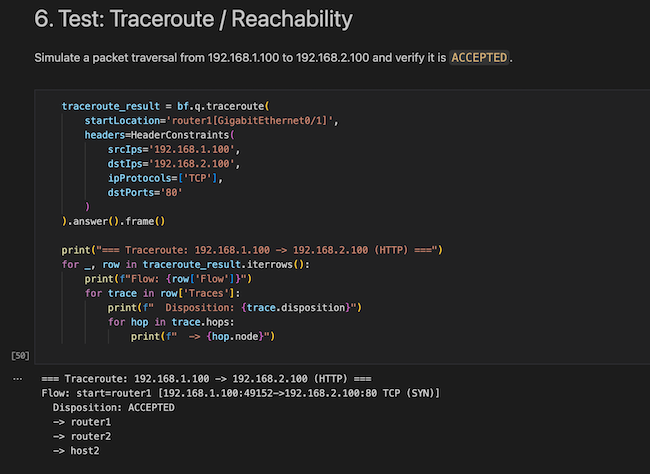
Batfish determines the answer by analyzing the network’s control plane and forwarding logic.
This allows engineers to verify connectivity before deploying changes to production.
Validating Routing Behavior
Batfish also allows us to inspect routing tables and protocol behavior.
For example, we can confirm that specific routes exist in the routing table.
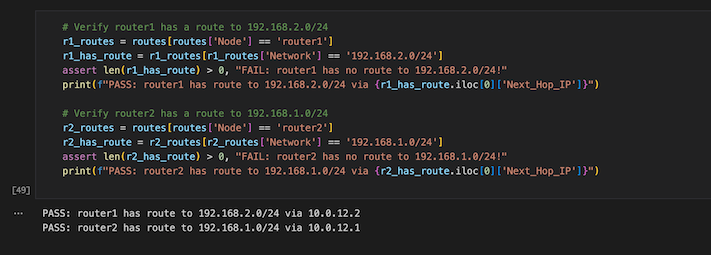
This makes it easy to validate routing protocol outcomes without logging into individual routers.
More importantly, it allows us to define what the expected network behavior should be.
Turning Checks into Tests
The real power of Batfish appears when we turn these checks into automated tests.
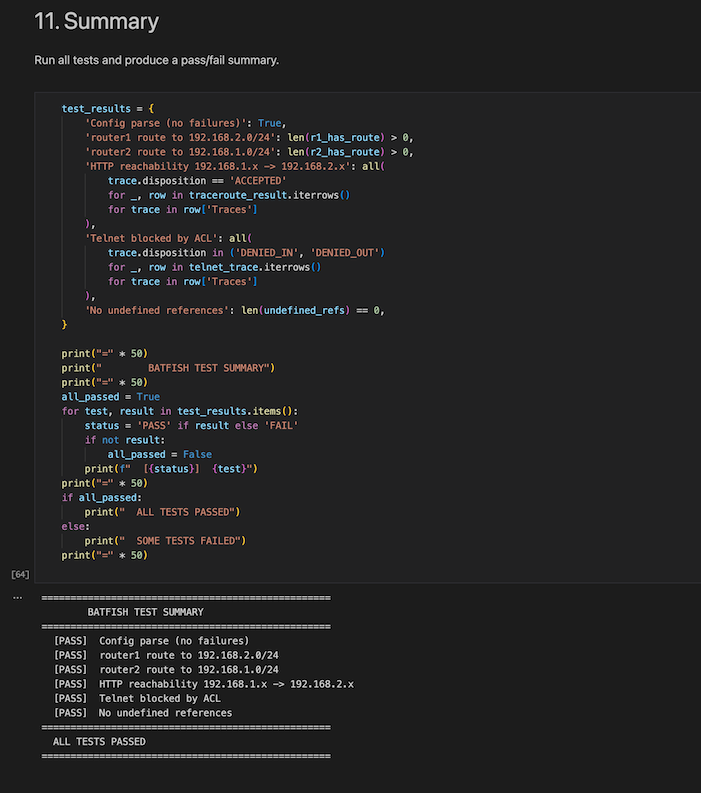
These tests describe how the network should behave.
For example:
- A subnet must be reachable from another subnet
- A route must exist in a routing table
- Traffic must be permitted or denied by policy
Once these tests are written, they become reusable validation checks that can be executed whenever the network configuration changes.
Why Automated Testing Matters
In traditional network operations, validating a change usually involves repeating the same steps every time:
- Make a configuration change
- Log into devices
- Check routing tables
- Run connectivity tests
- Confirm nothing broke
This process is repetitive and prone to human error.
Automated testing changes the workflow entirely.
Instead of manually verifying the network every time, engineers write tests once, and those tests are executed automatically whenever a configuration change is made.
This eliminates repeated effort and significantly reduces risk.
Introducing CI Pipelines
To run these tests automatically, we use a CI (Continuous Integration) pipeline.
Whenever a configuration change is pushed to the repository, the pipeline automatically runs the test suite.
A simplified pipeline workflow looks like this:
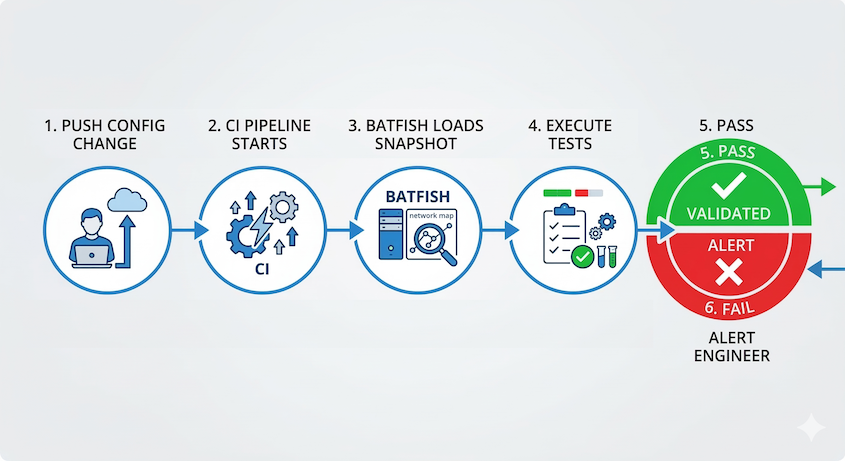
Engineer pushes configuration change -> CI pipeline starts -> Batfish loads the network snapshot -> Automated tests execute -> Pipeline passes or fails
If any test fails, the change is flagged before it reaches production.
Example GitLab CI Pipeline
The demo repository includes a simple GitLab CI pipeline that runs Batfish tests automatically.
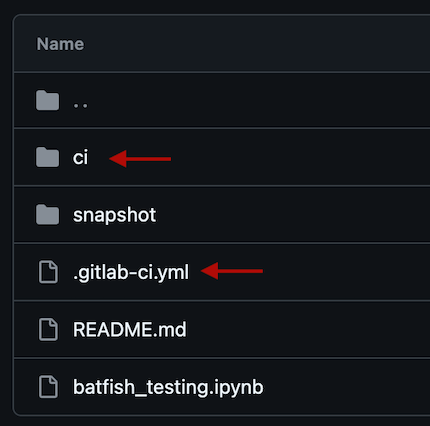
Each time a configuration change is pushed to the repository, the pipeline executes the Batfish validation tests.
Successful Pipeline Run
In the first example, all configurations are correct.
The pipeline runs the test suite and completes successfully.


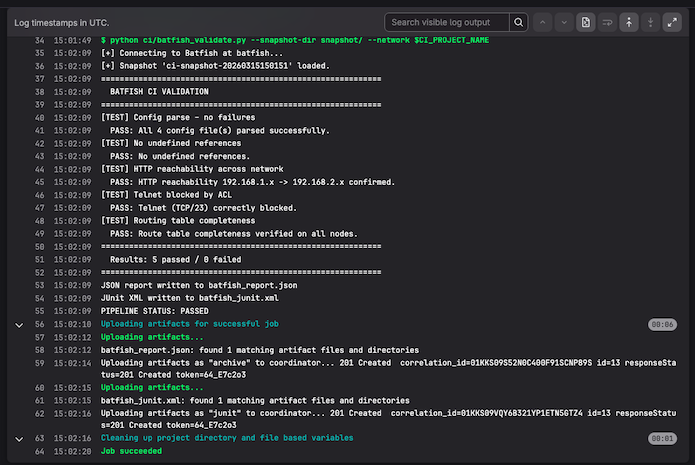
This confirms that the network behavior matches the expectations defined in the tests.
Demonstrating a Failure
To demonstrate the value of automated testing, we intentionally introduce an error.
We remove the 192.168.2.0 subnet from OSPF on Router 2.
This change means that the subnet should no longer be advertised through the routing protocol.
When the pipeline runs again, the tests detect this issue.
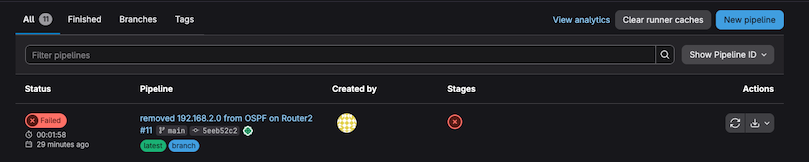
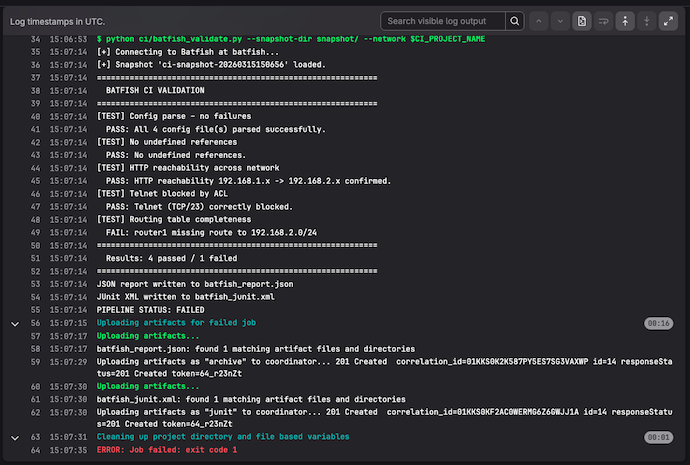
Because a test expected that subnet to be reachable, the pipeline fails.
Instead of discovering the issue after deployment, we catch it immediately during validation.
The Key Takeaway
Automated testing introduces a powerful safety mechanism into network operations.
By defining expected network behavior as tests, engineers gain:
- Repeatable validation
- Faster change verification
- Reduced risk during deployments
- Early detection of configuration mistakes
This approach moves networking closer to the engineering practices used in software development.
Try the Demo Yourself
If you’d like to explore this example in more detail, the full demo is available in my repository:
https://github.com/ppklau/network_automation/tree/main/learning/batfish
The repository includes:
- The Batfish Jupyter notebook walkthrough
- Example network validation tests
- A GitLab CI pipeline that runs those tests automatically
Final Thoughts
Automatic testing is one of the most important concepts in Network Automation.
Instead of relying on manual verification, we can encode network expectations into tests that run every time a change is made.
Tools like Batfish make this practical by allowing engineers to analyze configurations and validate behavior before deployment.
Once this approach is integrated into a CI pipeline, every change is automatically tested, creating a much fast, safer and more reliable network change process.